
Your CRM Data Is Lying to You
Most HubSpot portals are cluttered with outdated, incomplete, or inaccurate data. The result? Broken reports. Frustrated reps. Leadership flying blind.
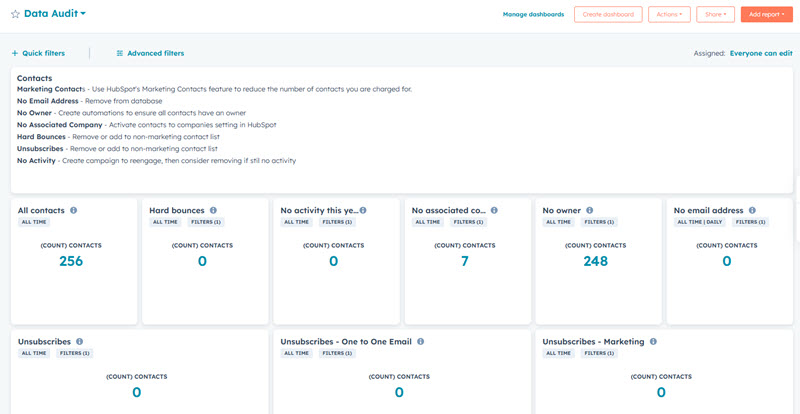
The HubSpot Data Audit Dashboard gives you a real-time, single source of truth for CRM health. In minutes, you'll see:
-
Contacts with missing emails or owners
-
Companies lacking key firmographics
-
Deals with no close date or pipeline assignment
Watch the step-by-step tutorial video to learn exactly how to build your own HubSpot Data Audit Dashboard.
Build Your Audit Dashboard
❌ My reports are never accurate—lead sources, pipeline stages, everything feels off.
❌ Why am I reaching out to contacts with no email or company info
❌ Reps aren’t using the CRM because it's a mess—no one knows what’s accurate.
The Data Audit Dashboard highlights missing or inconsistent data (like deal stages, owners, or lead source fields), so you can clean up reporting inputs and finally trust your dashboards again.
The dashboard reveals contacts missing emails, job titles, or company associations—letting you purge junk, enrich valuable records, and focus on leads that can actually convert.
By exposing and resolving incomplete records, the dashboard builds accountability, drives CRM adoption, and restores confidence across your sales and marketing teams.
A HubSpot Data Audit Dashboard is a custom-built reporting tool inside HubSpot that tracks incomplete, outdated, or missing CRM data across contacts, companies, and deals. It’s essential for identifying bad data that causes inaccurate reports, poor marketing targeting, and low sales adoption. If you're wondering "how do I audit my HubSpot data?" — this is your answer.
You can improve your HubSpot CRM data quality by using a Data Audit Dashboard to identify gaps like missing contact owners, deal stages, or invalid emails. Then apply HubSpot automation workflows to clean, enrich, and maintain your data.
HubSpot CRM data declines due to outdated contact info, form submissions with missing fields, manual entry errors, and abandoned records. Within 12–24 months, most portals accumulate bad data. A HubSpot Data Audit Dashboard lets you catch and fix these issues before they break your reporting.
Start by auditing core HubSpot properties:
-
Contacts: missing emails, no owner, no activity, hard bounces
-
Companies: no industry, no website, no associated contacts
-
Deals: no deal owner, missing close date, wrong pipeline
These are the key fields that drive segmentation, automation, and reporting accuracy in HubSpot.
Yes. With HubSpot Pro or Enterprise, you can set up CRM data cleanup workflows to assign owners, label non-marketing contacts, flag invalid records, and keep your database healthy. Automating data hygiene is critical for long-term CRM success.
To create a data quality dashboard in HubSpot CRM, start by identifying key properties that impact your sales, marketing, and reporting—such as contact owner, email address, lifecycle stage, company industry, and deal close date. Then, build custom reports that surface records missing this data. Combine these reports into a dashboard to monitor CRM health over time. Many users search for “HubSpot data health report” or “how to track missing data in HubSpot”—a dashboard like this is your best solution. Download the step-by-step tutorial to set up your dashboard now!