
Many companies using HubSpot face the same challenge: they’ve captured thousands of contacts in their CRM, but they have no clear way to determine which leads actually deserve attention.
When we began working with Inspire Software, this was exactly the situation they faced. Their HubSpot portal contained roughly 50,000 contacts, built through marketing campaigns, outbound outreach, and inbound engagement over time. Despite having a large database, their sales and marketing teams lacked a clear framework for identifying which leads were worth prioritizing.
Without a structured system, every contact can appear equally valuable. Sales teams may spend time pursuing leads that are unlikely to convert, while high-potential opportunities remain hidden in the database.
Our objective was to help Inspire use HubSpot’s lead scoring capabilities to identify high-value leads and turn their CRM into a more actionable system for both marketing and sales teams.
Using HubSpot Lead Scoring to Understand Fit and Engagement
HubSpot’s updated lead scoring tools allow companies to evaluate contacts using two key dimensions: fit and engagement.
Fit measures how closely a contact aligns with a company’s ideal customer profile. Engagement measures how actively that contact interacts with marketing and sales activity.
For Inspire, we built a scoring model that incorporated several important signals.
Fit signals included:
- Company size
- Industry alignment
- Job title and seniority
Engagement signals included:
- Visits to high-value website pages
- Interactions with sales outreach sequences
- Website behavior indicating buying interest
By combining these signals inside HubSpot, we created a Lead Qualification Matrix that categorizes contacts based on both engagement and ICP alignment.
Instead of relying on a single opaque score, contacts now fall into categories such as A1, B2, or C3, representing combinations of strong or weak fit and engagement.
Example: A Practical HubSpot Lead Scoring Model
To make lead scoring actionable, we designed a model that evaluates both ideal customer profile fit and engagement signals.
Below is a simplified example of the HubSpot lead scoring model implemented for Inspire.
Fit scoring criteria
- Job title or seniority aligned with decision makers → +20 points
- Company size within target range → +10 points
- Industry aligned with ICP → +10 points
Engagement scoring criteria
- Visit to high-value pages such as product or pricing → +10 points
- Engagement with sales outreach sequences → +10 points
- Form submission or demo request → +30 points
Contacts are then categorized using a lead qualification matrix that evaluates both engagement and ICP fit.
For example:
- A1 – High engagement / strong ICP fit (sales-ready)
- B2 – Moderate engagement / moderate ICP fit (marketing nurture)
- C3 – Low engagement / low ICP fit (low priority)
This type of HubSpot lead scoring model helps teams move beyond simple contact lists and instead focus on leads most likely to convert.
Secret: Turning Lead Scoring Into Actionable HubSpot Reports
A scoring model only becomes valuable when teams can easily interpret and act on the data. To accomplish this, we built several custom HubSpot reports and dashboards that translate scoring data into operational insights.
Lead Qualification Matrix (Fit vs Engagement)
This report visualizes how the entire database distributes across engagement and ICP-fit categories.
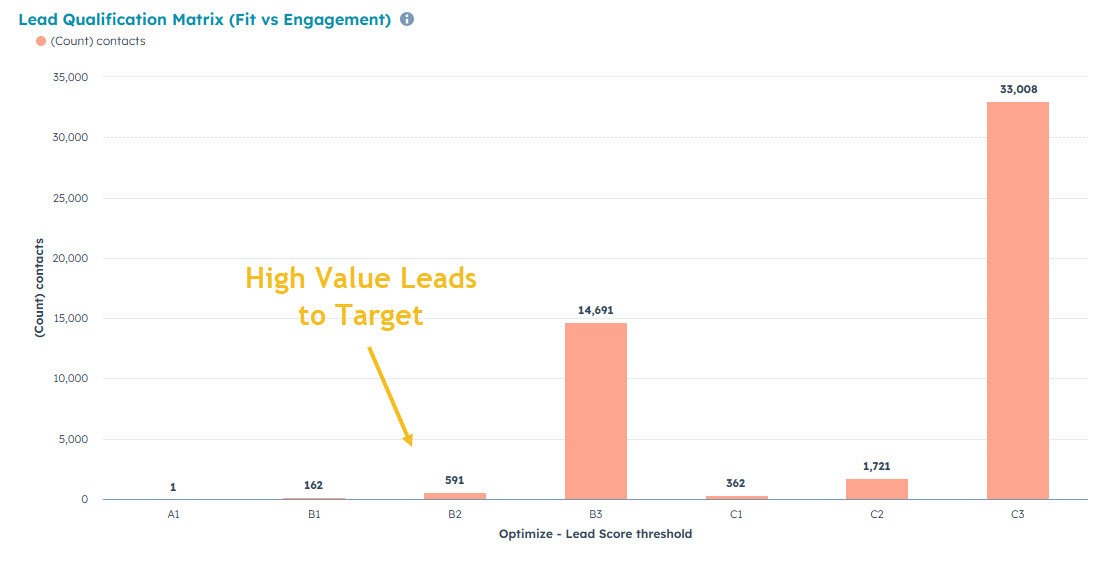
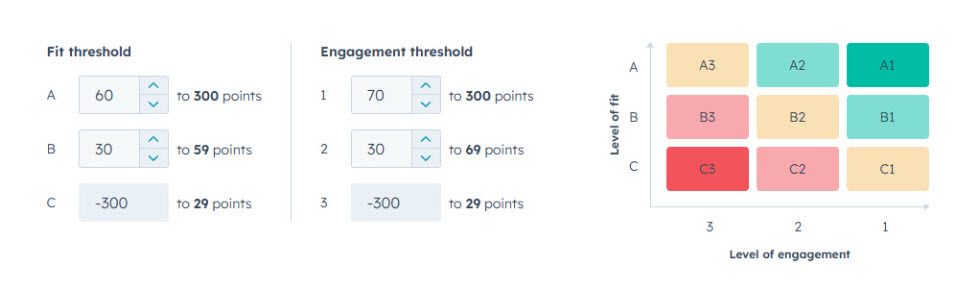
This matrix highlights the contacts that combine strong engagement with strong ICP alignment — the leads most likely to convert.
Average Lead Score for Closed-Won Deals
To validate the scoring model, we created a report showing the average lead score of contacts associated with closed-won deals.
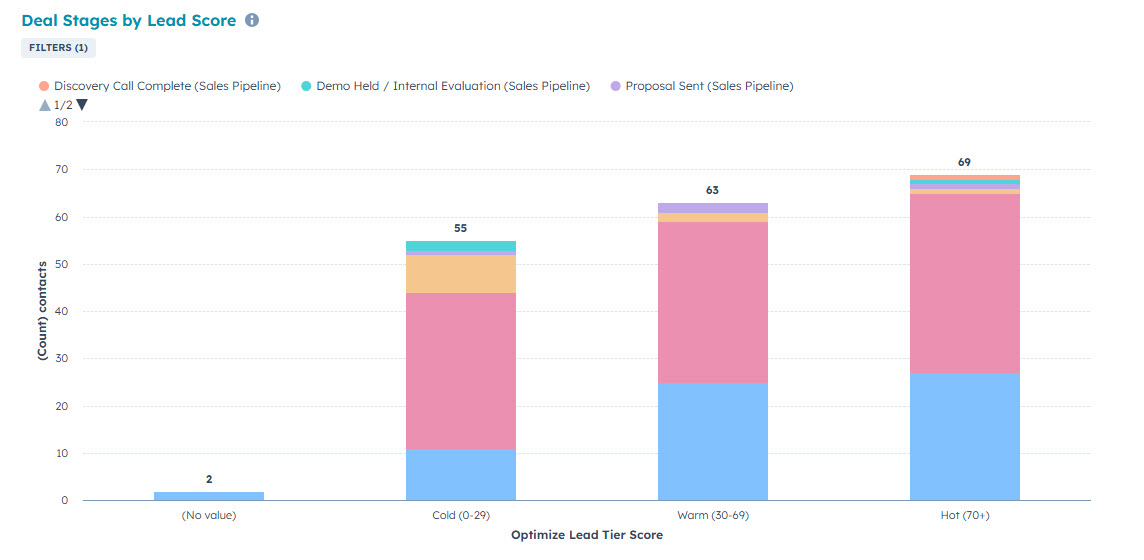
This helps confirm whether higher-scoring leads correlate with actual revenue outcomes.
Sales-Ready Contact Counts
Finally, we created a report identifying contacts that meet both engagement and ICP-fit thresholds.
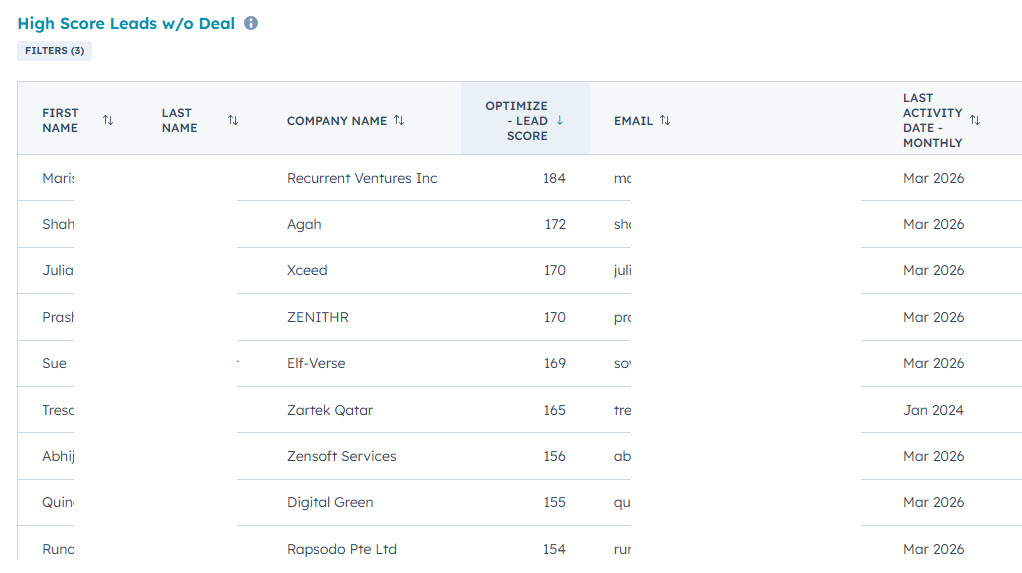
This allows sales teams to immediately focus on the most promising opportunities.
Turning Your HubSpot CRM Into a Lead Prioritization Engine
With a structured fit and engagement scoring framework, Inspire Software now has clear visibility into which contacts in their 50,000-contact database represent the highest potential value.
Sales teams can prioritize high-fit, high-engagement leads, while marketing focuses on nurturing contacts that require additional engagement. Most importantly, the organization now has a repeatable method for qualifying new leads as they enter the CRM.
When implemented correctly, HubSpot lead scoring transforms a large database into a system for prioritizing the opportunities most likely to convert.
Frequently Asked Questions
How does HubSpot lead scoring help prioritize high-value leads?
HubSpot lead scoring prioritizes leads by assigning points based on both ideal customer profile fit and engagement behavior. By combining firmographic data such as company size, industry, and job title with behavioral signals like website visits, email clicks, and form submissions, companies can identify which contacts are most likely to convert. This allows sales teams to focus on the highest-value opportunities instead of pursuing unqualified leads.
What data should be included in a HubSpot lead scoring model?
An effective HubSpot lead scoring model combines fit data and engagement data. Fit data may include company size, industry, geographic location, and job title. Engagement signals often include website visits, content downloads, email clicks, form submissions, and interactions with sales outreach sequences. Together, these signals help identify leads that match the ideal customer profile and demonstrate buying intent.
How can you build lead scoring dashboards in HubSpot?
Lead scoring dashboards in HubSpot are created using custom reports that visualize how contacts distribute across scoring tiers and engagement levels. Common reports include a lead qualification matrix showing fit versus engagement, a report displaying the average lead score of closed-won deals, and charts showing the distribution of contacts across lead score tiers. These dashboards help teams quickly identify sales-ready leads and understand the overall quality of their CRM database.