
 I've been a HubSpot partner for more than 15 years and have spent a lot of time working on email marketing, both promoting Optimize 3.0 and running campaigns for clients.
Over the years, I kept seeing the same type of email reply:
“I've left the company.”
Sometimes there was a replacement. Sometimes the person had retired or changed roles. Sometimes they simply told us who to contact going forward.
The information was valuable. The problem was getting it back into HubSpot.
It's Rarely Just a Contact Update
At first, it seems simple. Someone leaves, so update the contact.
But I quickly realized there was a lot more to it.
Should the original contact still be a Marketing Contact? Should the replacement become a Marketing Contact so they receive the right communications? Should a new contact be created, or does that person already exist in HubSpot?
Then there are company and deal associations, ownership, workflows, lists, notes, and follow-up tasks.
Marketing Contact status is particularly important. Leaving departed contacts as Marketing Contacts can affect your HubSpot contact tier and costs. At the same time, failing to add the replacement can mean the new person never receives the communications intended for them.
One email reply can create a surprising amount of work inside HubSpot.
That's what got me thinking about ContactContinuity.
The Information Is Already in the Email Reply
The contact is often telling you exactly what changed.
They've left the company. They're retiring. They've changed roles. Sometimes they even give you the name and email address of the person taking over.
The information is already there. The challenge is figuring out what needs to change in HubSpot and making those updates correctly.
I wanted a way to turn important email replies into HubSpot updates without requiring someone to manually work through everything that should happen next.
Building ContactContinuity
My experience working inside HubSpot was a big part of building the product. I understood that identifying the contact change was only half the problem. You also need to understand what that change means throughout HubSpot.
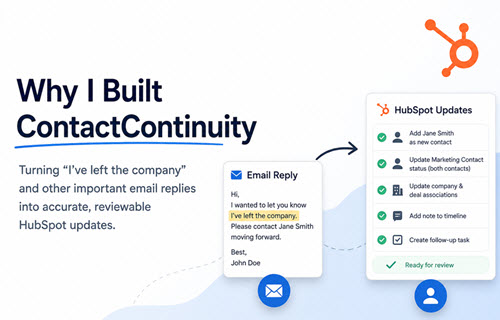
ContactContinuity analyzes the email, determines what happened, and prepares the appropriate HubSpot recommendations.
See ContactContinuity in Action
See how ContactContinuity identifies important information in an email reply and prepares the appropriate HubSpot updates for review.
Depending on the situation, that might mean creating a replacement contact, using an existing contact, updating Marketing Contact status for the departing and replacement contacts, preserving company and deal associations, adding notes, or creating follow-up tasks.
You can see more about how ContactContinuity works and explore the real-world email reply scenarios ContactContinuity handles.
Why I Built It
People are always going to leave companies. Roles change. People retire. Responsibilities move to someone else. Keeping HubSpot up to date was a near impossibility.
I couldn't find a solution that did it.
So I built one.
If your team deals with the same problem, see how to handle “I've left the company” email replies in HubSpot.